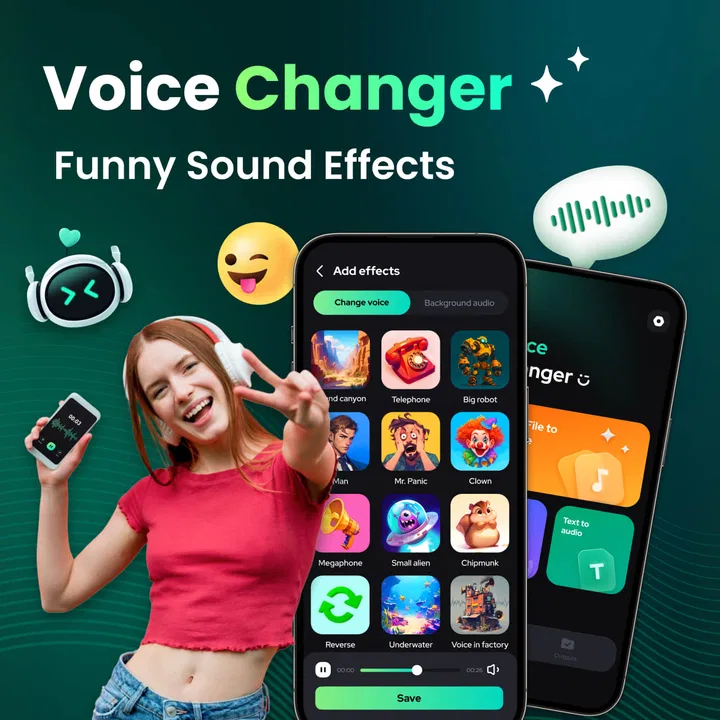
Voice Changer - Sound Effects
- 4.4
- Rating
- 500.00K
- Installs
- Free
- Price

 Analysis by App-foxy
I tried Voice Changer - Sound Effects as a lightweight way to turn ordinary recordings into playful audio clips, and my first impression was that it understands its audience well. This is not trying to be a full recording studio or a serious vocal-production suite. It is a Music & Audio app from Hitchhike Tech built around quick experiments: record a voice, apply a humorous treatment, listen back, and decide whether the result is worth sharing.
That focus makes it easy to understand. I can imagine opening it when a group chat needs a silly reply, when I want to add a character voice to a short video, or when I am testing a rough idea before moving into a more advanced editor. The app is free to start, carries an Everyone content rating, and runs on Android 8.0 or later. Its current version is 1.0.3, so I approached it as a simple, accessible tool rather than a mature production platform with a deep professional workflow.
From a quick idea to a usable sound clip
I find the useful part of this workflow is how quickly a spoken thought can become a testable sound idea. In the next section, I focus on the small recording choices that help the effect serve the message, rather than letting novelty take over.
You May Also Like

 Blood Strike: 2.5 Anniversary
Blood Strike’s Loadouts Turn Every Drop Into a Tactical Gamble
A close look at Blood Strike’s custom loadouts: how fast access to signature weapons reshapes its battle royale rhythm, rewards preparation, and narrows the gap between fights.

 Pandora - Music & Podcasts
Pandora’s Music Is Easy to Start, but Harder to Recover
Pandora’s strength is its low-effort path from a seed to a station. Its weak spot is how much confidence it asks you to place in connection, setup, and quiet recovery.

 8 Ball Pool
 Is Built on Rivalries, Rematches, and Routine
A close look at the rivalries, rematches, shared routines, and unanswered safety questions that turn a quick pool match into a persistent mobile community.

 Samsung Music
’s Quiet Strength Is Playing What You Already Own
Its reach comes less from spectacle than from dependable access to a personal library. That simplicity is both the app’s strongest retention engine and its ceiling.

 AccuWeather: Weather Radar
AccuWeather Review: A Quick, Clear Forecast for Everyday Decisions
For everyday plans, the best forecast is the one you can understand quickly. AccuWeather makes rain timing, radar, and local conditions easy to act on, with a few trade-offs.

 Hill Climb Racing
Why Hill Climb Racing Still Turns Crashes Into One More Run
A tiny car, a bumpy hill and one more upgrade: Hill Climb Racing keeps resurfacing because its simple chaos makes every near-miss feel personal.
More From Our News Desk
View All News


A good starting point for playful audio
The strongest part of this app is the low commitment involved in trying an idea. With a conventional audio editor, even a tiny joke can turn into a sequence of choices about tracks, trimming, effects, formats, and project management. Here, the creative starting point is much more direct. I can begin with a spoken line and concentrate on the result instead of learning a complicated interface.
That is especially useful when the goal is personality rather than polish. A funny greeting, an exaggerated reaction, a mock announcement, or a character line does not need studio-grade engineering to work. In those situations, the effect itself supplies the creative direction. I found that helpful because it encourages experimentation: I can try a normal delivery, a deliberately dramatic one, and a quieter version without treating every attempt like a permanent recording session.
The app’s store summary describes a voice changer designed for recording, editing, and adding humorous effects, and that accurately sets the expectation. I would not choose it as my main tool for music production, podcast mastering, or detailed sound design. I would choose it when speed and amusement matter more than a carefully controlled signal chain.
How I would use it in an everyday situation
Imagine a friend’s birthday coming up and the group wants to make a short audio message. I could write a few lines, record them in my normal voice, listen back, and then test a comic effect that gives the message a different character. If the first take sounds too restrained, I can record it again with a stronger performance rather than spending time fixing a weak delivery afterward. The useful creative decision is not simply which effect sounds funniest; it is matching the delivery to the effect.
For example, a slow and clearly spoken sentence usually gives an altered voice more room to remain understandable. A rushed sentence may become amusingly chaotic, but it can also lose the words that make the joke work. My practical tip is to record short phrases rather than one long speech. Short clips are easier to compare, easier to replace, and less frustrating when one part does not sound right.
This workflow also suits creators who need a temporary voice for a sketch or a short social post. I can use the app to test whether a character concept works before writing a larger script. That is a less obvious benefit: it functions as an idea filter. If the voice treatment does not make a simple line interesting, I probably need to rethink the character or performance before building more content around it.
Recording habits that make the effects more useful
The app cannot rescue every poor recording. I get better results when I speak close enough to the phone microphone for a clear signal, avoid tapping the device, and record away from loud background noise. Humorous processing can make unwanted room sound more noticeable, especially when the altered voice stretches or reshapes the original tone.
I also recommend leaving a small pause before and after the line. That gives the clip a cleaner beginning and ending and makes it easier to judge whether the effect feels intentional. If I start speaking immediately, the first syllable can feel cramped. If I stop abruptly, the result may sound less like a finished message and more like a test.
These are simple habits, but they matter because a voice changer is dependent on its source. The more intelligible the recording is before processing, the more freedom I have to choose a playful result without losing the message. This is one reason I see the app as a creative tool rather than a magic button: the performance still does much of the work.
Choosing an effect by purpose, not novelty
When I test voice effects, my first instinct is usually to pick the strangest option. That is fun for a minute, but it is not always useful. A better approach is to start with the intended destination. A private joke can tolerate an effect that makes every word difficult to recognize. A clip intended for friends who were not present during the recording needs clearer speech. A character sample may benefit from an unusual tone, but only if it remains consistent across several lines.
I would make a small set of versions from the same original recording: one restrained, one exaggerated, and one chosen purely for comedy. Comparing them side by side is more reliable than judging each version in isolation. The most dramatic result is not automatically the best one. Often the version that preserves the rhythm of the speaker feels more natural and is easier to reuse in another piece of content.
The best creative choice is often the effect that keeps the joke understandable. That sounds obvious, yet it is easy to forget when an app makes experimentation so quick. The novelty should support the line, not bury it.
Editing as a short iteration loop
The editing stage is where this app makes sense for casual creators. I can treat each recording as a draft and evaluate it immediately. Instead of trying to perfect one take, I prefer a short loop: record, apply an effect, listen with headphones, identify the weakest moment, and record again. This approach is faster than attempting to repair every problem after the fact.
Headphones are particularly useful for judging whether the altered voice remains pleasant and intelligible. Phone speakers can hide low-level noise or make a harsh effect seem less noticeable. Listening privately also helps me decide whether the clip will work outside the excitement of the recording moment. A sound that makes me laugh once may become tiring after repeated playback.
For a creator preparing several lines, consistency becomes the main challenge. I would keep the same speaking distance, energy, and general pace between takes. Even if the app applies the same style, changes in the original performance can make the character sound like a different person from one sentence to the next. Recording a short reference line first gives me something to imitate during later attempts.
Where the quick workflow has limits
The simplicity that makes the app approachable also creates boundaries. I would not expect the same level of control I get from a traditional digital audio workstation. If I need precise equalization, layered music, detailed noise repair, automation, or careful mastering, I would move the project to a more specialized editor. This app is better at producing a distinct voice idea quickly than at managing a complex audio arrangement.
That limitation is not a flaw for its intended use, but it affects the handoff stage. A short joke or character sample may be ready after a few attempts. A polished podcast segment or commercial voiceover will probably need additional work elsewhere. I would rather know that before starting than assume a novelty effect can replace a complete production workflow.
There is also a creative trade-off in heavily processed voices. Once an effect becomes the main identity of a clip, it can reduce flexibility. A line that works only because of one exaggerated treatment may not fit naturally beside unprocessed speech. For a series of videos, I would test the effect against the surrounding content before committing to it as a recurring signature.
Preparing a clip for sharing or handoff
My handoff advice is to listen to the complete result before sending or publishing it. Check the opening, the final word, and the volume against other audio that will appear beside it. If the clip is going into a video editor, I would import it as a test and make sure the voice still stands out once music, captions, or background sound are present.
I would also keep the original recording until I am certain the processed version works. The unaltered take is valuable if I later decide that a milder effect is better, or if I want to try a different treatment for another platform. This is a practical creator habit that saves time: the first recording is not merely disposable input; it is the source material for future variations.
For a quick message, the handoff can be informal. For a public post, I would be more selective. Listen once at low volume, once through headphones, and once in the context where people will encounter it. A voice that sounds clear in a quiet room may become hard to follow in a busy feed. The app helps create the character, but I still need to judge the final listening environment.
Cost, access, and who should try it
Voice Changer - Sound Effects is free to download, with optional in-app purchases ranging from $6.99 to $27.99 per item. That makes it easy to test the basic experience before deciding whether it deserves a place in a regular creative routine. I appreciate that approach for a novelty-focused app because not every user will need more than occasional recordings.
The app has passed 500K installs and holds a 4.4 average from around 2.3K ratings, which suggests that the quick, entertaining concept has found a sizeable audience. I would treat those figures as a sign of broad appeal rather than proof that it will fit every workflow. People looking for a serious audio editor should still compare its simplicity with the controls they actually need.
It is a good match for casual creators, families making funny messages, students experimenting with character work, and anyone who wants a fast audio gag without studying production software. The Everyone rating also makes the app approachable for a broad audience, although I would still use sensible judgment when sharing altered voices or recording other people.
I would skip it if my priority were transparent vocal recording, detailed sound correction, multitrack composition, or a repeatable professional delivery process. A standard recorder is better when I want the speaker to sound natural. A dedicated audio editor is better when I need control over every stage. This app occupies the middle ground between those options: more playful than a recorder, much less demanding than a full studio.
My verdict for creative production
After using it as a small idea-to-clip tool, I see the main value clearly. It shortens the distance between a funny thought and a shareable audio experiment. The most successful workflow is not to record a long performance and hope an effect fixes it. It is to make short, clear takes, compare a few treatments, preserve the original, and hand off only the version that still communicates the intended line.
Hitchhike Tech has kept the concept focused enough for beginners to understand quickly. The trade-off is that experienced audio creators may outgrow it once they need layered projects or detailed finishing. That is perfectly reasonable for this category, but it means I would use it alongside other tools rather than expecting it to replace them.
My recommendation is straightforward: try it if you want a fast, humorous way to shape voices for messages, sketches, or early creative tests. Start with a clean recording, choose effects according to the purpose of the clip, and judge the result in its final context. If you need precision more than personality, choose a conventional recorder or a full audio editor instead. For quick character ideas and playful sound handoffs, though, Voice Changer - Sound Effects is an inviting tool that makes experimentation feel easy rather than technical.
FAQs for Voice Changer - Sound Effects
01What is Voice Changer - Sound Effects and what can it do?
Voice Changer - Sound Effects is an entertainment app designed to record your voice and transform it with different audio filters and sound effects. Depending on the available tools, you can make your voice sound deeper, higher, robotic, funny, or otherwise altered. It is mainly intended for casual recordings, jokes, social content, and sharing edited audio with friends.
02Is Voice Changer - Sound Effects free to download and use?
The app can generally be downloaded at no initial cost, but some features may be limited behind advertisements, in-app purchases, or a premium subscription. Before using it regularly, check the store listing and the in-app purchase screen carefully. Premium access may unlock additional voice effects, remove advertising, provide better export options, or offer other editing features.
03How do I record and change my voice in the app?
After opening Voice Changer - Sound Effects, you normally begin by granting microphone permission and tapping the recording button. Once you finish speaking, select an effect from the available list to preview the modified audio. You can usually compare several filters, adjust the result if editing controls are provided, and then save or share the final recording.
04Can I save and share recordings made with Voice Changer - Sound Effects?
The app is designed to let users listen to processed recordings and, where supported, save them to the device or share them through messaging apps and social networks. Export options can vary by device, operating system, and app version. Keep in mind that some sharing or saving functions may require watching an advertisement or upgrading to a paid version.
05Is Voice Changer - Sound Effects safe and suitable for children?
The app is generally intended for harmless entertainment, but users should review its permissions, advertising practices, privacy policy, and age rating before installing it. Microphone access is necessary for recording, while unrelated permissions deserve closer attention. Children should use the app with appropriate supervision, especially because advertisements, external links, purchases, and shared recordings may be present.
Pros
- Offers many voice effects for jokes
- videos
- and casual entertainment.
- Simple interface makes effects easy to find and apply.
- Works well for creating short
- shareable audio clips.
- Useful for adding sound effects to recordings.
- Provides quick results without requiring audio-editing experience.
Cons
- Some effects may sound artificial or repetitive after extended use.
- The free version may include ads or limit certain features.
- Recording quality depends heavily on the phone’s microphone.
- Sharing options may vary by device and installed apps.
- Privacy permissions should be reviewed before recording personal conversations.

Voice Changer - Sound Effects
Gallery